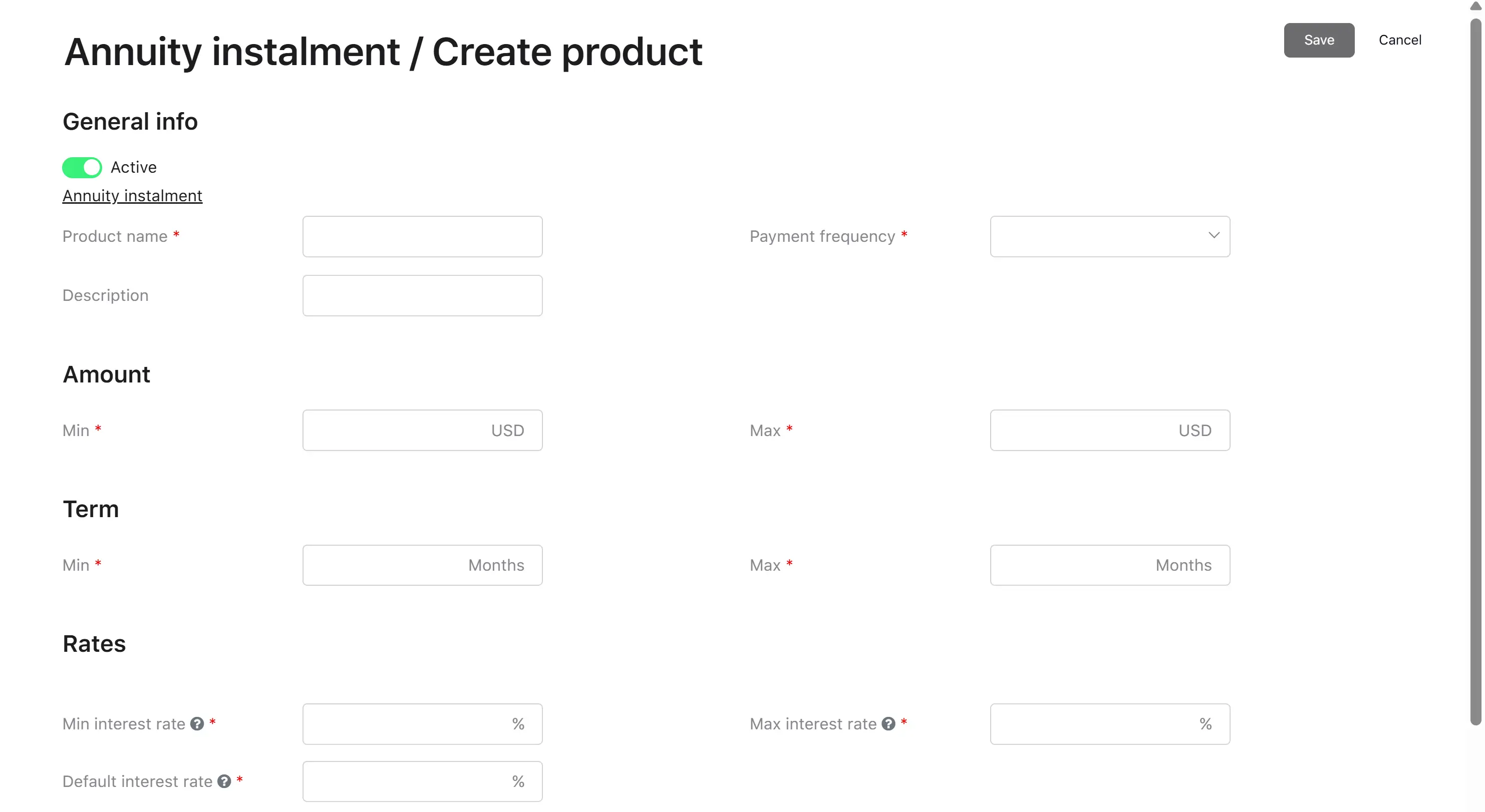
Creating a product is available to users with the Credit Officer role. A product is always created within a specific product group.
Step 1. Navigating to creation
The user opens the product group card and clicks the “Create product” button. The system opens the product creation form, indicating the parent group.
Step 2. Filling in parameters
The user fills in all required fields of the form (described below in Product parameters). The set of visible fields
depends on the parent product group’s settings (loan type, interest rate type, calculation type).
Step 3. Saving
The system validates the data while the fields are being filled in, including verifying that the product’s ranges fall within the group’s ranges. If all
fields are filled in correctly, the “Save” button becomes active. If errors are found, the system displays messages next to the corresponding fields. When a
user clicks the “Save” button, the system saves the created product.
Result: the product is created and is active by default (the “Active” flag is on).
Maximum 20 characters. Must be unique within the group
Payment frequency
Dropdown
Yes
Values from the frequency list configured in the parent product group
–
Hidden if the group’s calculation type is Pay-Day Loan
Product description
Text
No
Free text
–
Maximum 255 characters
Amount
Parameter
Type
Required
Possible Values
Default
Notes
Minimum loan amount
Number
Yes
From 0.01
–
Cannot be less than the group’s minimum amount. Cannot be greater than the group’s maximum amount. Cannot be greater than the product’s
maximum amount
Maximum loan amount
Number
Yes
From 0.01
–
Cannot be less than the group’s minimum amount. Cannot be greater than the group’s maximum amount. Cannot be less than the product’s minimum
amount. Must be strictly greater than the establishment fee
Term
Parameter
Type
Required
Possible Values
Default
Notes
Minimum loan term
Number
Yes
From 1
–
Cannot be less than the group’s minimum term. Cannot be greater than the group’s maximum term. Cannot be greater than the product’s maximum
term. The unit of measurement is inherited from the group
Maximum loan term
Number
Yes
From 1
–
Cannot be less than the group’s minimum term. Cannot be greater than the group’s maximum term. Cannot be less than the product’s minimum
term. The unit of measurement is inherited from the group
Rates
The set of fields depends on the group’s interest rate type: fixed rate and floating rate.
Fixed rate
Parameter
Type
Required
Possible Values
Default
Notes
Minimum interest rate
Number (%)
Yes
From 0
–
Cannot be less than the group’s interest rate. Cannot be greater than the product’s maximum rate. Annual rate for instalment loans, daily
rate for Pay-Day Loan
Maximum interest rate
Number (%)
Yes
From 0
–
Cannot be less than the product’s minimum rate. Annual rate for instalment loans, daily rate for Pay-Day Loan