
Collection task for the Back-Office user
This section describes the Call the borrower task that the Collection Manager works with. It is the only task in the Collection workflow that the Collection Manager actually performs on screen. (The Credit Officer’s Write off the loan task is described separately at the end of this section.)
Task appears
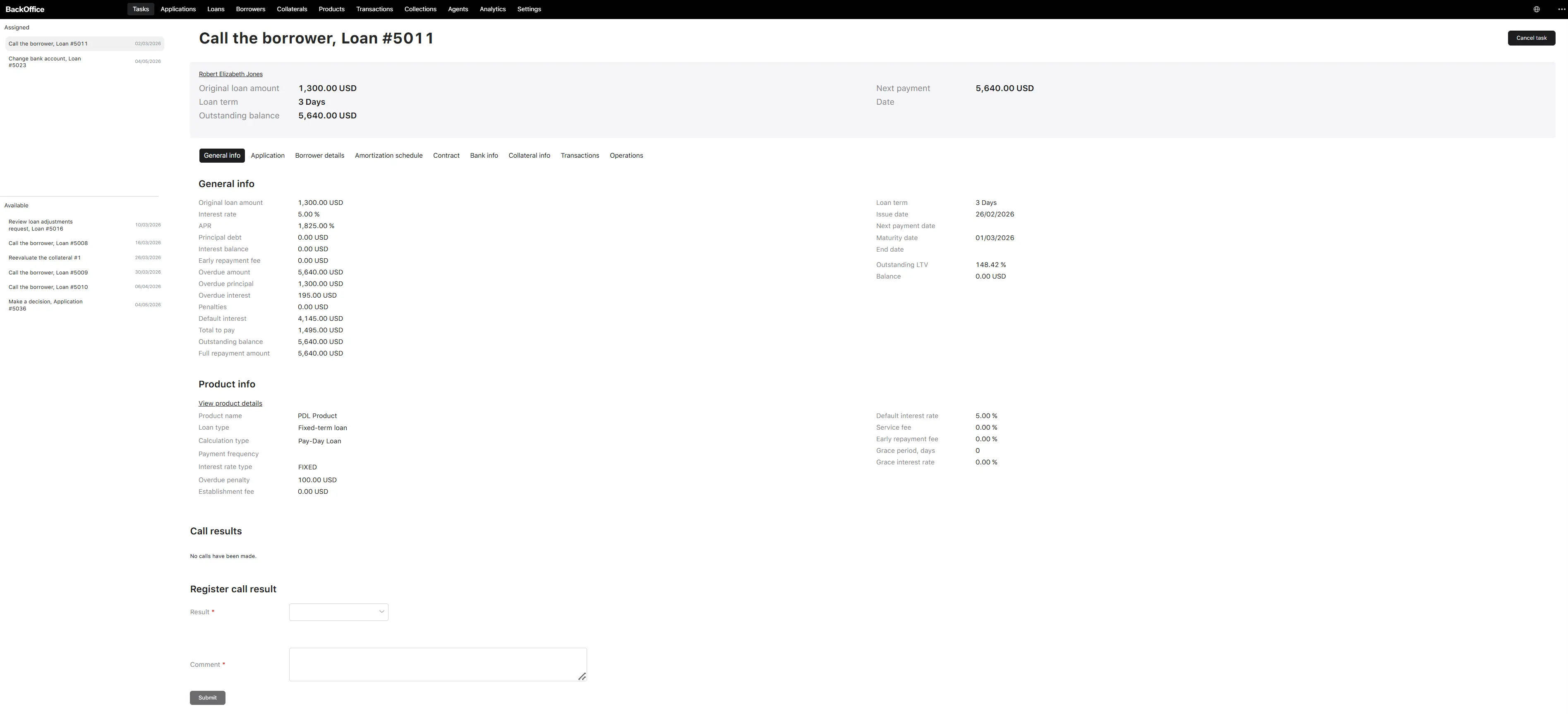
A “Call the borrower” task appears in the Collection Manager queue:
- when a collection case is first opened (after the configured days-in-overdue waiting period), or
- whenever the previous contact loop reaches its scheduled re-contact day (the day after the promise-to-pay date, or the next reminder date).
The task title shown in the queue is “Call the borrower, Loan #{loan number}”. Any user with the Collection Manager role can take the task. If the assignee does not finish it within the configured timeout, the task returns to the queue, and another manager can pick it up.
Data seen by the operator
The screen is split into three sections, top to bottom.
Section 1 — Loan information (read-only)
A summary of the loan being collected. It is read-only and is refreshed automatically with the latest values when the task opens.
For a fixed-term loan, the summary card shows:
| Field | Description |
|---|---|
| Borrower | Full name of the borrower, with a link to the borrower profile. |
| Original loan amount | Amount approved at origination, with the system currency suffix. |
| Loan term | Term of the loan, in days or months depending on the product. |
| Outstanding balance | Total amount still to be repaid (principal + interest + penalties + default interest). |
| Next payment | Amount of the next scheduled instalment. |
| Date | Date of the next scheduled instalment. |
The loan card also gives access to general information panels: General info, Product info, Application, Borrower details, Bank info, Amortization schedule, Contract, Transactions, Operations, Collateral info, Financial info.
For a credit line, an equivalent loan information block is shown instead, sized to the credit-line layout.
Section 2 — Call results history (read-only)
A table listing every previous call recorded on this collection case, ordered from the most recent call first. Columns:
| Column | Description |
|---|---|
| Call date | Date and time the call was made. |
| Author | Full name of the Collection Manager who recorded the call. |
| Result | Outcome chosen for that call (Got a promise to pay / Didn’t get a promise to pay / Need to write off). |
| Promise to pay date | Date the borrower committed to repay (only for “Got a promise to pay” outcomes). |
| Amount | Amount the borrower committed to pay, in the system currency. |
| Comment | Free-text note recorded by the manager. |
If no call has been recorded yet, the table is replaced by the message “No calls have been made.”
Section 3 — Register call result (the operator’s input)
This is where the manager enters the outcome of the current call. It is titled “Register call result”.
| Field | Description | Type | Required | Possible values | Notes |
|---|---|---|---|---|---|
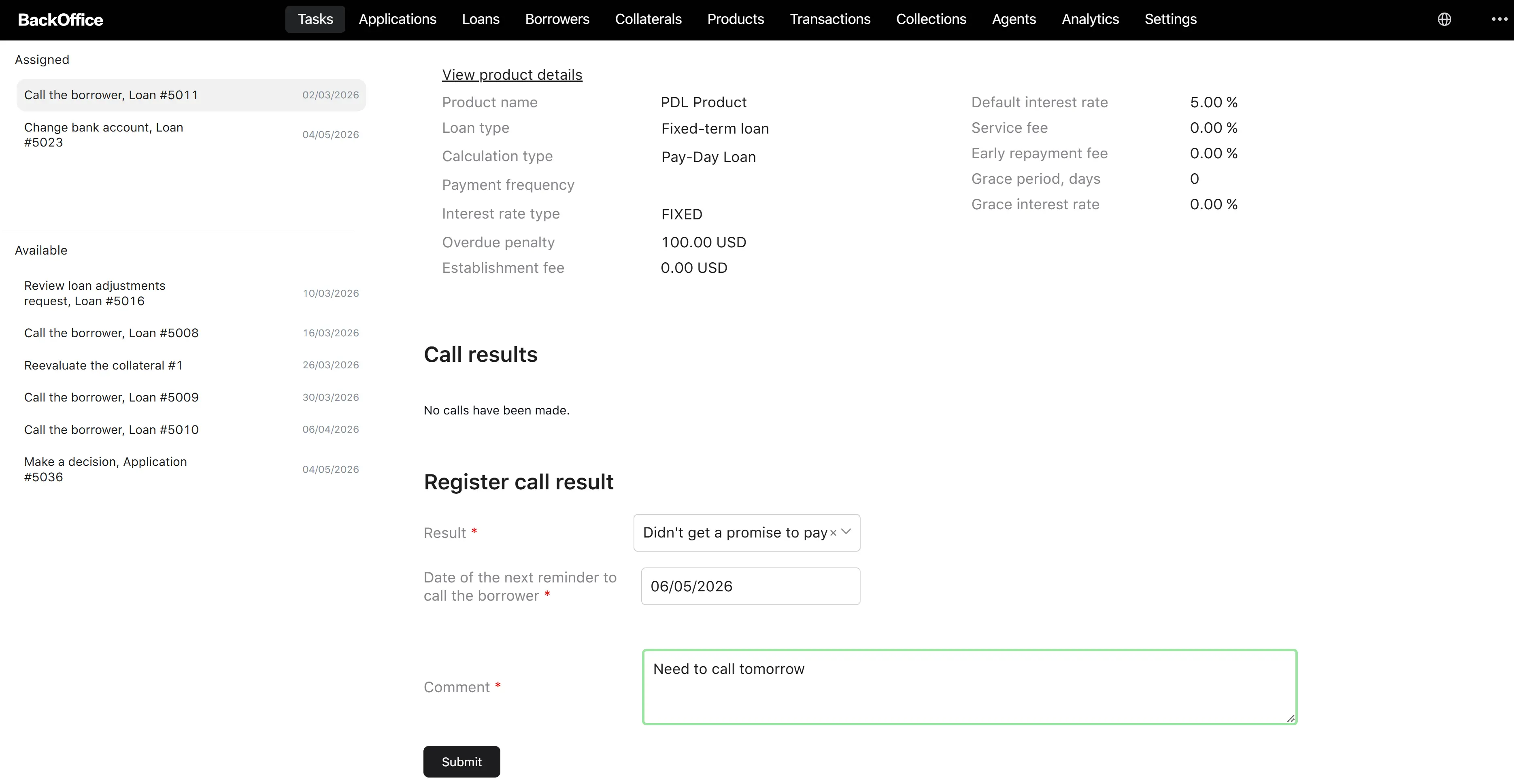
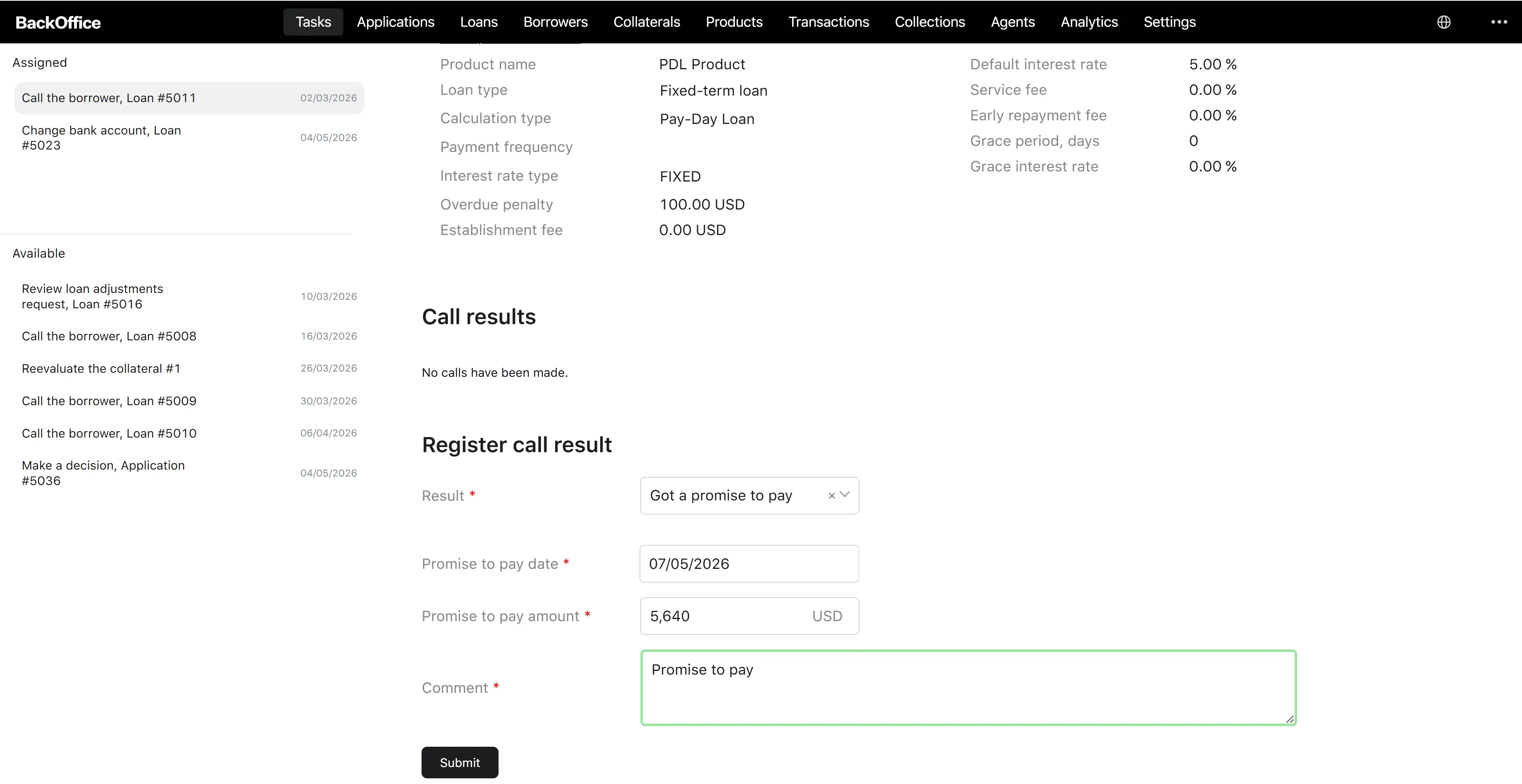
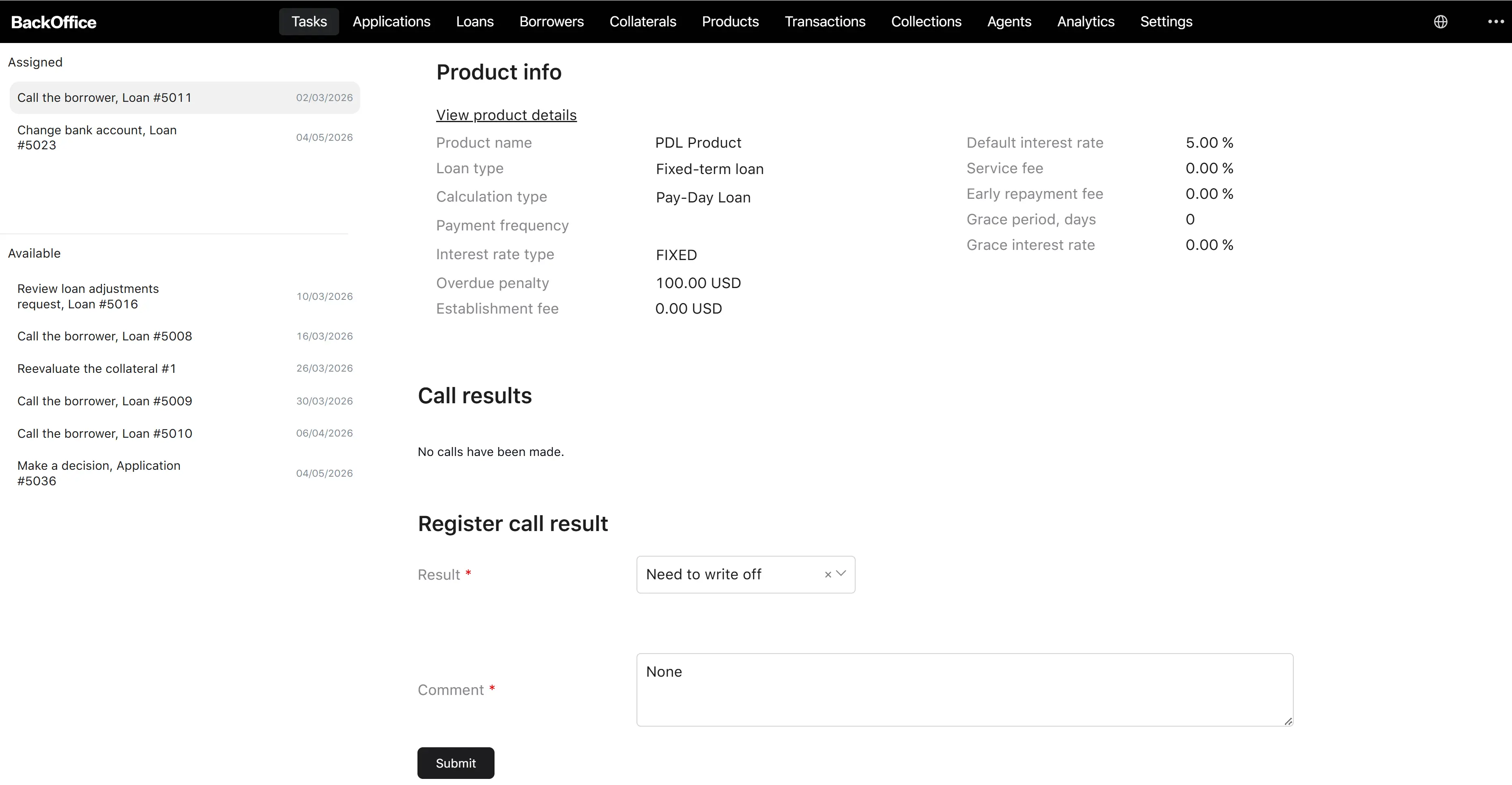
| Result | The outcome of the call. | Dropdown | Yes | Got a promise to pay / Didn’t get a promise to pay / Need to write off | Choosing a value reveals different supporting fields below (see the table after this one). |
| Promise to pay date | The date by which the borrower commits to pay. | Date | Yes (only when Result = Got a promise to pay) | — | The date must be in the future. Past or current dates are blocked by the date picker. |
| Promise to pay amount | The amount the borrower commits to pay, in the system currency. | Number | Yes (only when Result = Got a promise to pay) | — | Must be greater than 0 (minimum 0.01) and not greater than 40,000,000. |
| Date of the next reminder to call the borrower | The date on which the system should reassign a new “Call the borrower” task to the queue. | Date | Yes (only when Result = Didn’t get a promise to pay) | — | The date must be in the future. |
| Comment | Free-text note about the conversation. | Multi-line text | Yes | — | Maximum length: 255 characters. |
Upon submission, the platform automatically records the Author (the full name of the logged-in manager) and the Call date (the moment the form is submitted). The manager does not enter these fields.
Result dropdown — full list of values
The Result dropdown has exactly three values:
| Value | Description |
|---|---|
| Got a promise to pay | The borrower acknowledged the debt and committed to repay on a specific date for a specific amount. |
| Didn’t get a promise to pay | The borrower did not commit to a payment (could not be reached, refused, asked for more time without a firm commitment, etc.). |
| Need to write off | The manager assesses that the debt cannot be recovered and the loan should be written off. |
Conditional fields — what each Result requires
| Result chosen | Additional required fields |
|---|---|
| Got a promise to pay | Promise to pay date, Promise to pay amount, Comment |
| Didn’t get a promise to pay | Date of the next reminder to call the borrower, Comment |
| Need to write off | Comment only |
Available actions
There is a single action button on the form: Submit. The button is disabled until all required fields for the chosen Result are filled in correctly.
There is no separate “Save draft”, “Cancel”, or “Delete” action on this task. To release the task back to the queue, the manager simply leaves it untouched until the timeout expires; the platform then automatically returns it to the queue.
Next steps after decisions
After the manager clicks Submit:
| Decision (Result) | What the system does next |
|---|---|
| Got a promise to pay | The platform records the call result on the collection case, then waits until the day after the Promise to pay date the manager entered. When that day arrives, a new Call the borrower task is placed in the queue. If the borrower repays the overdue amount before that day, the case is automatically closed as Successful instead, and no new task is created. |
| Didn’t get a promise to pay | The platform records the call result on the collection case, then waits until the Date of the next reminder the manager entered. When that day arrives, a new Call the borrower task is placed in the queue. As above, if the borrower repays first, the case is closed as Successful and no new task appears. |
| Need to write off | The platform records the call result on the collection case and creates a Write off the loan task in the Credit Officer queue. No further “Call the borrower” tasks will be created for this loan unless the Credit Officer’s task is somehow cancelled. |
In all three cases, the call result becomes immediately visible in the Call results table on the next “Call the borrower” task and on the Collection screen.
“Write off the loan” task
When the Collection Manager chooses Need to write off, a follow-up task is sent to the Credit Officer. Its title is “Write off Loan #{loan number}”. Any user with the Credit Officer role can take it.
The Credit Officer screen has three sections:
- Loan information — the same read-only loan summary as on the Call the borrower form.
- Call results — the same read-only history of every call, so the officer can see why the loan was escalated.
- Write off the loan — a single dropdown:
| Field | Description | Type | Required | Possible values | Notes |
|---|---|---|---|---|---|
| Write-off reason | The reason the loan is being written off. The list of options depends on the borrower type (Person vs Legal entity). | Dropdown | Yes | See tables below | — |
Write-off reason — values for Person borrowers
| Value | Description |
|---|---|
| Non-performing loan | The loan is non-performing and is being written off as such. |
| Legal decision | A legal decision has resulted in the write-off. |
| Borrower went bankrupt | The borrower has been declared bankrupt. |
| Borrower died | The borrower has died and the debt cannot be recovered. |
Write-off reason — values for Legal entity borrowers
| Value | Description |
|---|---|
| Non-performing loan | The loan is non-performing and is being written off as such. |
| Legal decision | A legal decision has resulted in the write-off. |
| Borrower went bankrupt | The legal-entity borrower has been declared bankrupt. |
The Credit Officer clicks Submit to confirm. The platform then:
- writes off the loan (status moves to Written off, with the chosen reason recorded), and
- closes the collection case with status Failed.
After this point, no new “Call the borrower” tasks will be created for the loan, and the Collection screen will show the case as Failed.