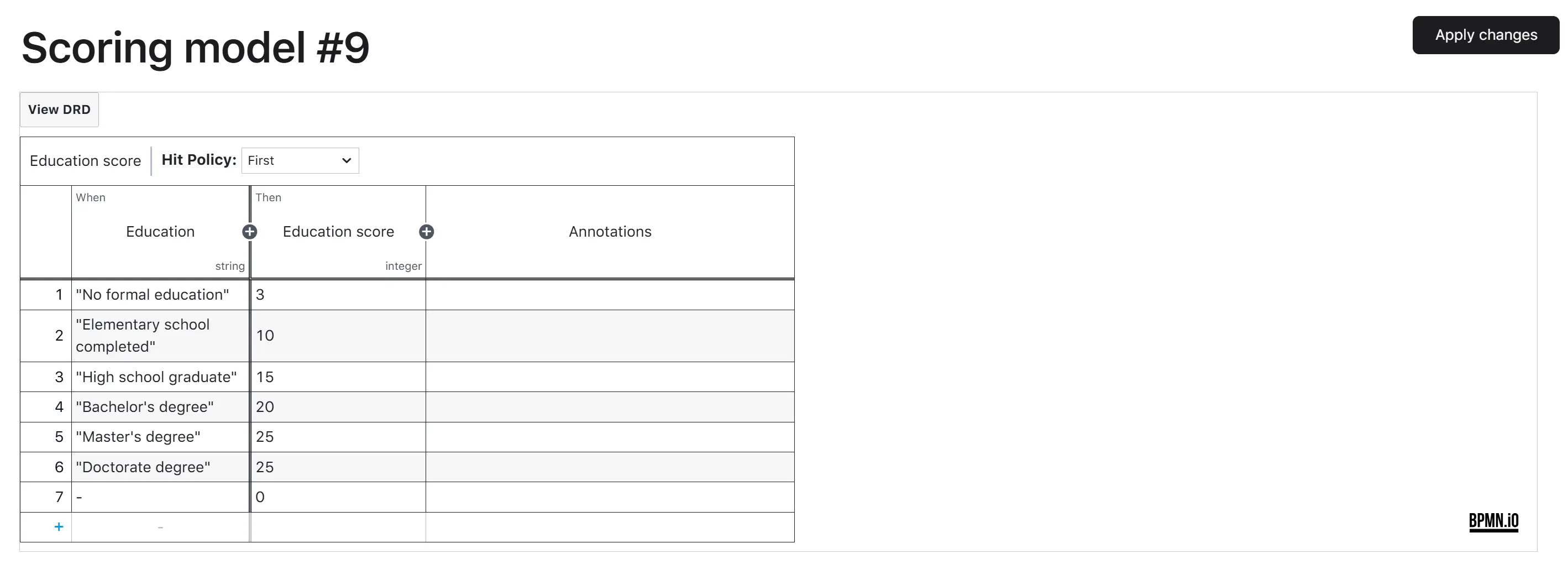
Scoring model setting
The Scoring model setting is the screen where a credit officer manages the platform’s internal credit-scoring logic used during loan origination. A scoring model is a decision table (uploaded and edited as a DMN file) that takes borrower attributes from a loan application and returns a scoring outcome (rank, zone, decision). The system uses this outcome, along with other risk-evaluation results, to decide whether to approve, review, or reject the application.
The platform ships with default scoring models. The exact catalog depends on the borrower type the platform instance is configured for:
| Borrower type | Default scoring model |
|---|---|
| Person (individual borrowers) | Default person model |
| Legal entity (corporate borrowers) | Default legal entity model |
A platform instance always operates with a single borrower type, so a credit officer typically sees a single scoring model on this screen. The model itself is permanent—it is never deleted. What changes over time is its content, and every change produces a new version of the same model.
A scoring model carries:
- Model ID / title—internal identifier shown on the screen header (e.g., “Scoring model #1”).
- Borrower type—which borrower type this model applies to (Person or Legal entity).
- Decision content (DMN)—the actual decision table that turns borrower data into a scoring result. Edited inline in the screen’s DMN editor.
- Version history—every previously deployed version of this model with its lifecycle dates.
Version statuses
A scoring model version can be in one of the following statuses:
| Status | Description |
|---|---|
| Draft | A working copy of the next version of the model. The credit officer is editing the decision content; nothing the platform uses for live scoring has changed yet. |
| Active | The version that the platform currently uses for every internal scoring run. Exactly one version per model is active at any time. |
| Inactive | A previously active version that was replaced when a newer version became active. Kept in the history for audit. |
| Failed | A version whose deployment or validation against the test data failed. It is not used by the platform; the credit officer can edit it again and re-apply. |
At any moment, a model has exactly one Active version, optionally one Draft or Failed version being prepared, and any number of historical Inactive versions.
Setting dependencies
Depends on:
- The borrower type of the platform instance (Person or Legal entity). The set of scoring models displayed on the screen and the test data used for validation are selected accordingly.
- The decision-table file is uploaded / edited by the credit officer. The platform does not generate scoring logic on its own—a credit officer must author it.
Affects:
- Every internal credit-scoring run during loan origination. When a product group is configured to use an internal scoring provider, the platform looks up the active version of the matching scoring model and evaluates the borrower’s loan application against it. The scoring outcome feeds into the application’s risk decision.
- Product group configuration. Product groups reference a scoring model by name in the “Internal scoring model” parameter. As long as the model exists and has an active version, the product group continues to work—only the content of that active version changes when a new version is applied.
- Existing loan applications already in scoring. Each scoring run uses the version that is active when scoring executes. Applications scored before the change keep their previous result; applications scored after the change use the new logic.
Roles and permissions
Editing the scoring model is restricted to Credit Officer. The screen is read-only for other roles.
How to view
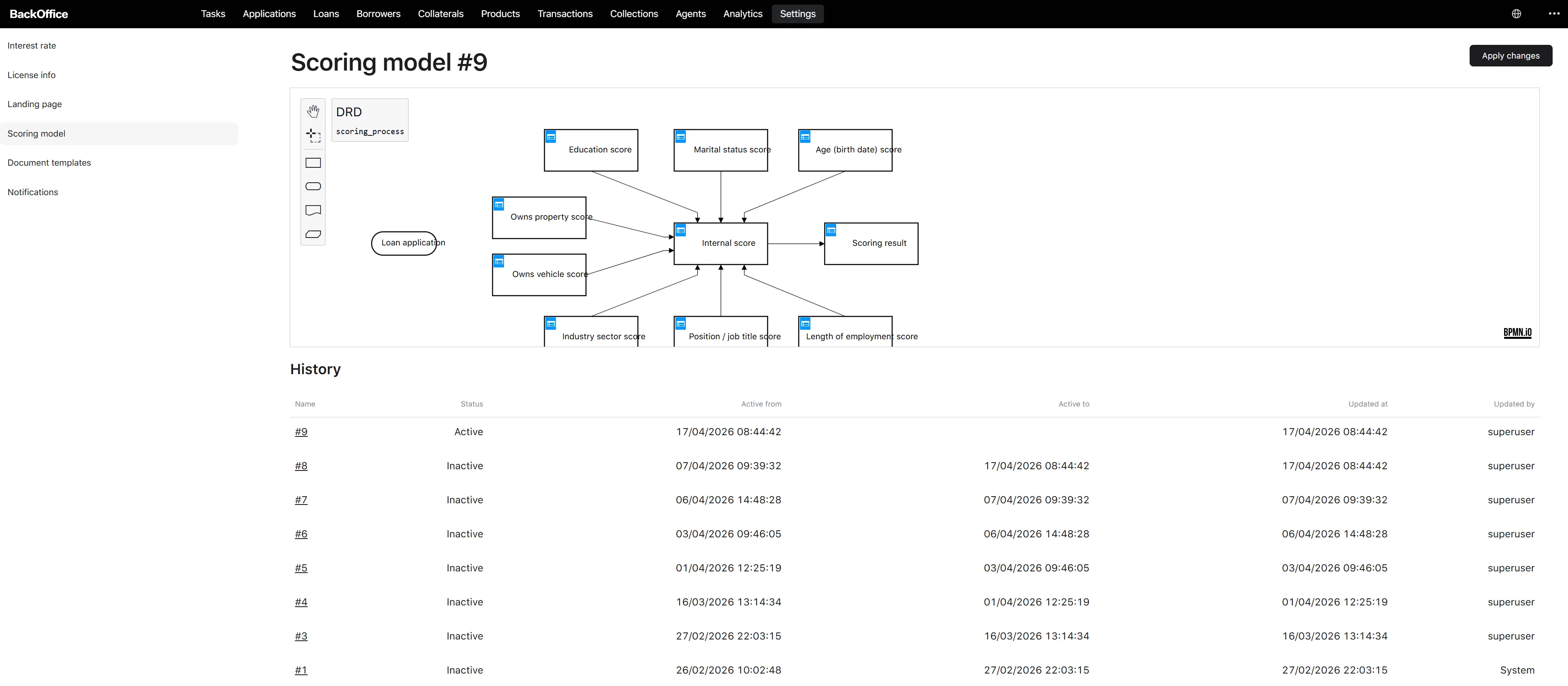
The Scoring model screen shows:
- The model header—“Scoring model #{id}”.
- The decision-content editor with the active model’s decision table loaded.
- The History panel—a paginated table of every version (10 rows per page).
- The Apply changes button (top right), enabled only after the credit officer has edited the decision content.
History columns:
| Column | Content |
|---|---|
| Name | The version reference (e.g., “#42”). Click-through to that version’s content. |
| Status | Localized status: Draft, Active, Inactive, Failed. |
| Active from | Date and time the version became active. |
| Active to | Date and time the version was superseded. Empty for the currently active version. |
| Updated at | Last update date and time of the version record. |
| Updated by | The credit officer who last edited the version. |
Actions on a Scoring model
The set of actions available on a scoring model is intentionally small—the model itself is permanent, only its content changes.
| Action | Where | Who | Purpose |
|---|---|---|---|
| View active model | Scoring model screen | Any authorised back-office role | Inspect the currently active decision content and the version history. |
| Edit the decision content | Decision-content editor | Credit Officer | Modify the decision table to produce a new draft. The active version itself is not touched until the credit officer explicitly applies the changes. |
| Apply changes | “Apply changes” button | Credit Officer | Run the Apply changes process described below—deploy and validate the new content, then make it the active version. |
There is no manual “delete,” “deactivate,” or “rollback” action. A version becomes Inactive only when a newer version becomes Active. To roll back, the credit officer applies the previous content as a new version—the system treats it as a new change and goes through the full Apply changes process.
Apply changes process
The Apply changes process is what turns the credit officer’s edits into the new active scoring logic. It runs end-to-end automatically once the credit officer clicks Apply changes, with no further input required.
Step 1. Edit the decision content
On the Scoring model screen, the credit officer modifies the decision table inside the editor. The system stores the edits as a Draft version of the model—the active version is not yet affected.
Step 2. Click Apply changes
The credit officer clicks Apply changes. → The system saves the draft and starts the Apply changes process in the background. The screen does not block: the credit officer can navigate away. The outcome will be communicated by an email notification.
Step 3. The system deploys the new version
The system deploys the edited decision table as a new version of the scoring logic.
-
If deployment fails (the file is malformed, references unknown attributes, etc.):
- The new version is marked Failed.
- The credit officer receives a “Dmn validation failed” notification.
- The previous Active version stays active and continues to be used for scoring.
- The credit officer can return to the screen, fix the content, and apply again—this re-uses the same Failed version (a new Failed/Draft version is not created on top of an existing one).
- End of process.
- If deployment succeeds, the process continues to Step 4.
Step 4. The system validates the new version against test data
The system runs the new decision table against a built-in test loan application that matches the platform’s borrower type (Person or Legal entity). This catches situations where the file deploys but produces an error during evaluation.
-
If validation fails:
- The system rolls back the deployment (the just-deployed decision is removed).
- The new version is marked Failed.
- The credit officer receives a “Dmn validation failed” notification.
- The previous Active version stays active.
- End of process.
- If validation succeeds, the process continues to Step 5.
Step 5. The system retires the previous active version
The system finds the version of this model that is currently Active, sets its status to Inactive, and stamps its Active to date with the current moment. The previous content is preserved in the history.
Step 6. The system activates the new version
The system sets the new version’s status to Active and stamps its Active from date with the current moment. From this moment, every internal scoring run for this model uses the new content.
Step 7. The system notifies the credit officer
The credit officer receives a “New version created” notification confirming that the change is live.
Result:
- The model now has one new Active version with the just-applied content.
- The previously active version is Inactive, with Active to set to the moment of the change.
- The model’s history records every step.
- All future internal scoring runs for this model use the new logic. Already-scored applications keep their original results.
Important notes about the process:
- The previous active version is never deleted. It remains in the history as Inactive and can be inspected or re-applied later.
- While a draft is being prepared and applied, the platform continues to score new applications against the previous active version. There is no service interruption.
- Only one Draft or Failed version per model can exist at a time. The credit officer must finish (or fix) the current attempt before starting a new edit.
- If the platform is configured for Person borrowers, the test data used during validation is a sample person application; for Legal entity borrowers, it is a sample legal-entity application.