
Reading GiniMachine scoring results
GiniMachine results appear on the application’s Scoring tab and again inside the Make a decision task for applications awaiting a credit decision.
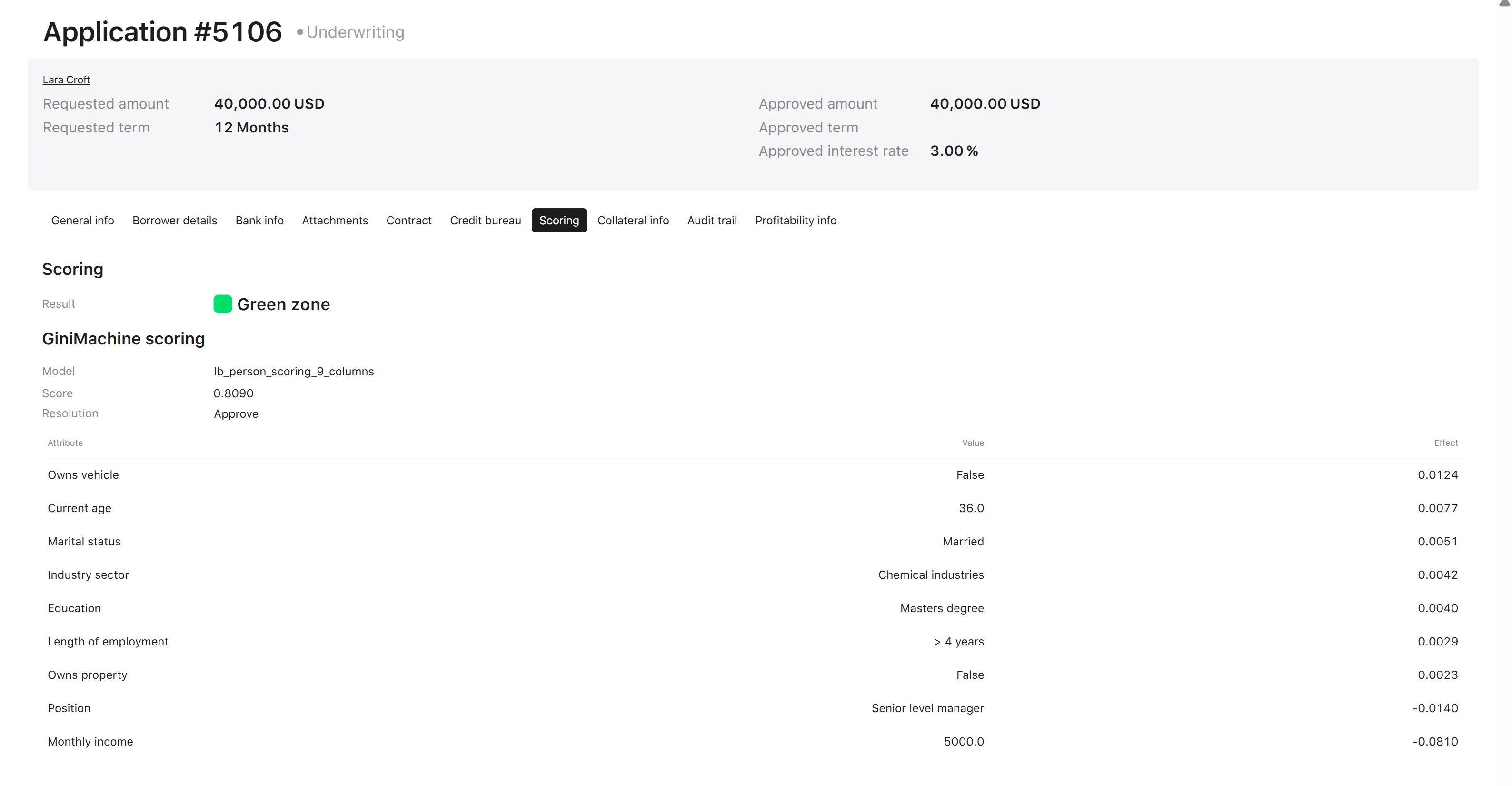
The application record carries the following tabs:
- General info
- Borrower details
- Bank info
- Attachments
- Contract
- Credit bureau
- Scoring
- Collateral info
- Audit trail
- Profitability info
The Result line
The Result at the top of the Scoring tab is the output of the Scoring result decision table — the combined verdict, not GiniMachine’s. It is displayed with a color indicator.
The GiniMachine scoring block
| Field | Example | Description |
|---|---|---|
| Model | lb_person_scoring_9_columns | The model that produced this result. Recorded on the application, so a result can be traced back to the model that generated it. |
| Probability of repayment | 0.8090 | The model’s numeric output for this application. |
| Resolution | Approve | The model’s verdict and the value passed into the Scoring result decision table. |
The attribute effect table
Below the Probability of repayment, GiniMachine lists every attribute the model used, with the value taken from the application and that attribute’s effect.
| Attribute | Value | Effect |
|---|---|---|
| Owns vehicle | False | 0.0124 |
| Current age | 36.0 | 0.0077 |
| Marital status | Married | 0.0051 |
| Industry sector | Chemical industries | 0.0042 |
| Education | Masters degree | 0.0040 |
| Length of employment | > 4 years | 0.0029 |
| Owns property | False | 0.0023 |
| Position | Senior level manager | −0.0140 |
| Monthly income | 5000.0 | −0.0810 |
How to read it:
- The table is sorted by effect, descending — the strongest positive contributors first, the strongest negative contributors last.
- The sign shows the direction of each attribute’s contribution to the outcome; the magnitude shows how much weight it carried.
- Magnitude matters more than sign when reviewing an application. In the example above, Monthly income = 5000.0 at −0.0810 carries roughly six times the weight of any single positive contributor: the application scored well overall, but income was the one attribute working against it.
- The attributes listed are exactly the ones the model was trained on. A model named …_9_columns shows nine rows.
The attributes with the largest negative effects are the starting point for explaining a declined application to the borrower, where the market requires it.