
Collection process
The Collection process runs automatically in the background. It has three stages:
- Trigger and routing — the platform detects the loan is overdue, decides whether collection applies, and selects the right collection workflow.
- Default collection workflow — if applicable, the platform opens a collection case and runs iterative contact cycles with the borrower.
- Closure — the case is closed when the debt is settled, when the loan is written off after a credit officer’s decision, or when the loan is written off by some other workflow.
Stage 1. Trigger and routing
Step 1.1 — Loan becomes overdue.
The platform’s daily check marks the loan as Overdue. An internal “Loan is in overdue” signal is raised. This is the trigger for collection.
Step 1.2 — Choose the collection strategy.
The platform looks at the Collection strategy configured on the loan’s product group:
- If the product group’s collection strategy is Default, the Default Collection workflow is started for this loan.
- If the product group has no collection strategy set (effectively “None”), the process ends immediately. The loan stays overdue and continues to accrue penalties and interest as configured on the product, but no contact tasks are created, and no collection case is opened.
Note
Stage 2. Default Collection workflow
If the product group uses the Default collection strategy, the platform runs the workflow described below. The workflow lives across two roles: the Collection Manager (who works with the borrower) and the Credit Officer (who authorizes write-offs).
Step 2.1 — Wait for the configured number of days in the overdue state.
The platform does not start contacting the borrower the moment the loan becomes overdue. It first waits for the number of days defined by the product group’s Days in overdue before collection starts parameter. During this wait, the loan continues to accrue penalty and default interest as described above.
Step 2.2 — Open a collection case.
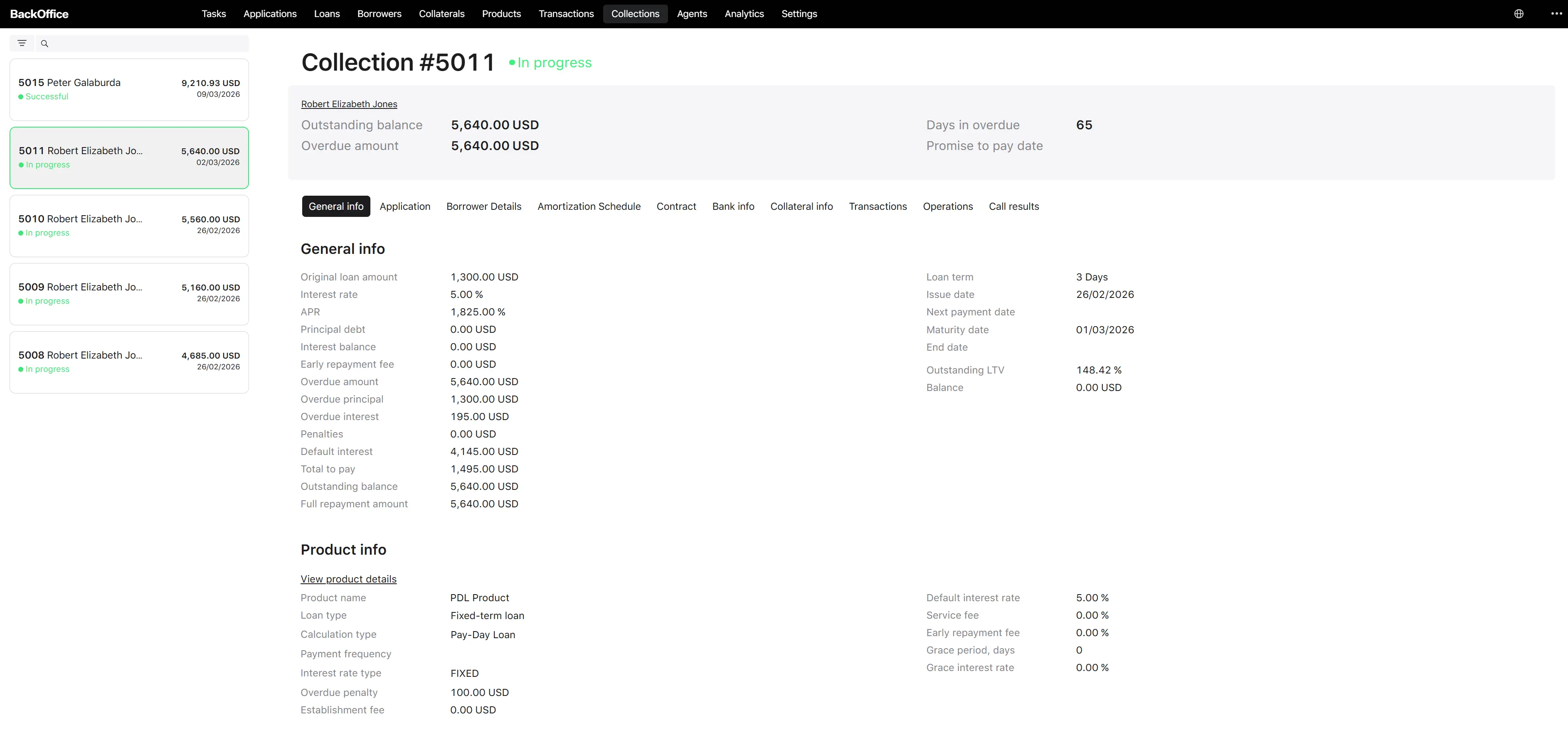
When the wait period ends, the platform creates a collection case and links it to the loan. The case is created with a status of In progress. It carries:
- a unique case number (system-generated),
- a start date (the moment the case was opened),
- the linked loan,
- an empty list of call results that will be filled in over time,
- a promise-to-pay date field that is automatically derived from the most recent call result (no one types it manually).
Step 2.3 — Refresh loan data.
Before assigning the next contact task, the platform reloads the latest loan figures (balances, days overdue) so the operator always sees the most recent values.
Step 2.4 — Assign the “Call the borrower” task to the Collection Manager.
A new task is placed in the Collection Manager queue. Any user with the Collection Manager role can pick it up. The task is described in detail in the Collection task for the Back-Office user section.
If a Collection Manager picks up the task but does not complete it within the configured timeout, the task is automatically returned to the queue for someone else to handle.
Step 2.5 — Manager records the call result.
The manager calls the borrower, picks one of three outcomes, fills in the supporting fields, and submits the form. The platform stores this as a call result on the collection case. Possible outcomes are:
- Got a promise to pay — the borrower has committed to repay by a specific date.
- Didn’t get a promise to pay — the borrower did not commit.
- Need to write off — the manager believes the debt is not recoverable.
Step 2.6 — Branch by outcome.
- If “Got a promise to pay”: the platform schedules a wait until the day after the Promise to pay date the manager entered. When that day arrives, the workflow returns to step 2.3 — refresh the loan and assign the next “Call the borrower” task. If the borrower has actually paid in the meantime, the case is closed automatically before the next call is needed (see step 2.7 below).
- If “Didn’t get a promise to pay”: the platform schedules a wait until the Date of the next reminder entered by the manager. When that day arrives, the workflow returns to step 2.3 — refresh the loan and assign the next “Call the borrower” task.
- If “Need to write off”: the platform sends a Write off the loan task to the Credit Officer queue (see step 2.8).
The contact loop (steps 2.3–2.6) repeats indefinitely until one of the terminal events listed in stage 3 occurs.
Step 2.7 — Automatic closure on debt settlement.
At any point during the contact loop, if the borrower repays the overdue debt (the platform receives a “debt has been settled” signal from the payments domain), the collection case is automatically closed with status Successful. The whole workflow stops.
Step 2.8 — Credit Officer writes off the loan.
If the Collection Manager selected Need to write off in step 2.5, the platform creates a Write off the loan task in the Credit Officer queue. The Credit Officer:
- Reviews the loan details and the full history of call results.
- Selects a Write-off reason from the list applicable to the borrower type (Person or Legal entity).
- Submits the task.
The platform then writes off the loan and closes the collection case with a status of Failed.
If a Credit Officer picks up the task but does not complete it within the configured timeout, it is returned to the queue.
Stage 3. Closure
A collection case can end in three ways:
| End condition | Final case status |
|---|---|
| Borrower repays the overdue debt (debt-settled signal received). | Successful |
| Credit Officer writes off the loan after the Collection Manager’s “Need to write off” outcome. | Failed |
| The loan is written off by some other workflow outside of collection (an external write-off signal is received). | Failed |
Once a case reaches Successful or Failed, no further contact tasks are scheduled for that loan. These are terminal statuses.
External debt-collection systems (optional)
The platform supports forwarding overdue cases to an external debt-collection provider. When configured, a separate “Initiate debt collection” workflow chooses the provider for the current environment and transmits the loan data to that provider. Updates from the provider are not received automatically — the case remains closed by the same internal signals (debt settled, loan written off). Whether this integration is used at all and which provider is selected are environment-level configurations, not per-loan settings.