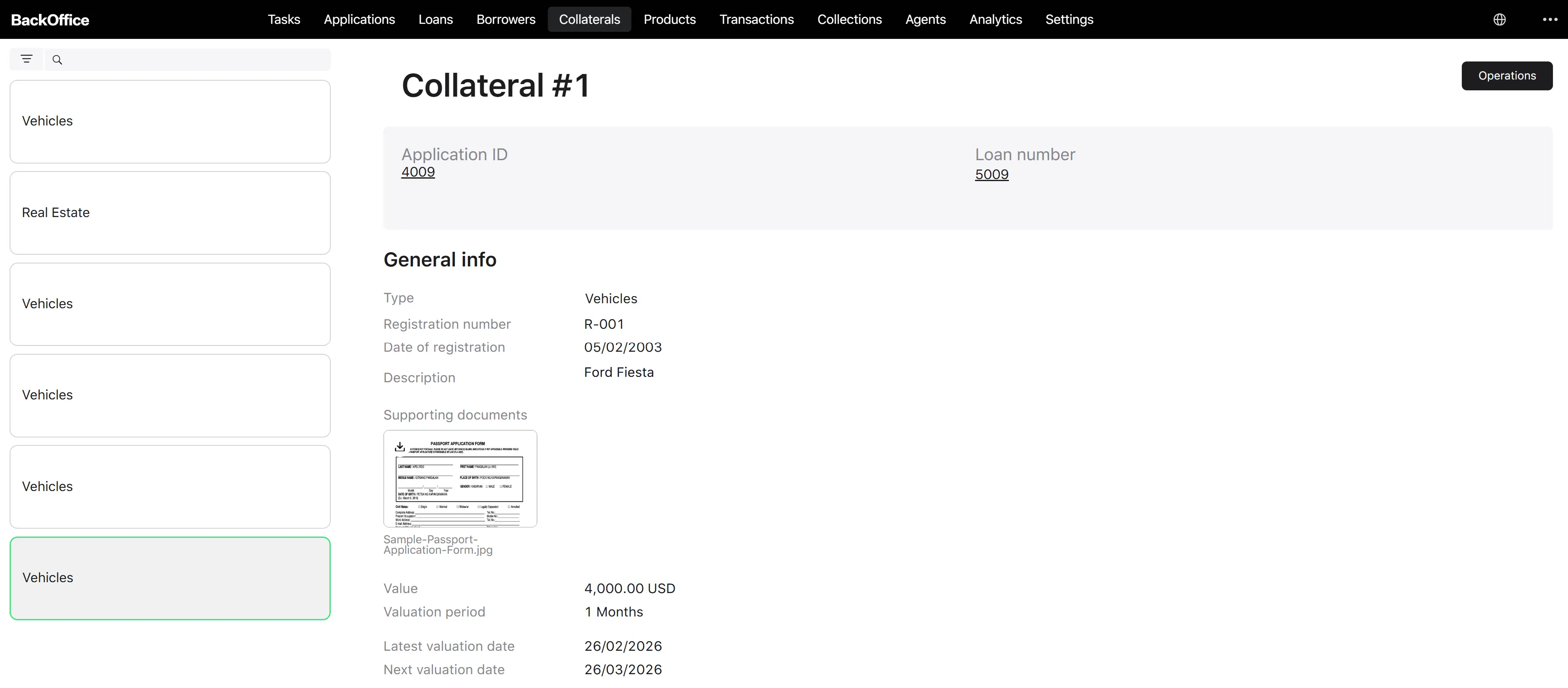
Collateral list, filters, and details
Collateral list
The back-office collateral list shows all collateral records across all loan applications. Access is granted to Verifier, Underwriter, and Credit Officer roles.
The list supports paging and is sorted by creation date, newest first by default.
Filters
| Filter | Type | What it does |
|---|---|---|
| Search | Free-text | Searches across the collateral registration number and the loan number that the collateral is attached to. |
| Collateral types | Multi-select | Filters by one or more of the five collateral types: Real estate, Vehicles, Equipment and machinery, Securities, Other. |
Collateral types in the dropdown (all 5 values):
| Value | Display label |
|---|---|
| REAL_ESTATE | Real estate |
| VEHICLES | Vehicles |
| EQUIPMENT_AND_MACHINERY | Equipment and machinery |
| SECURITIES | Securities |
| OTHER | Other |


Collateral detail page
Clicking a row opens the collateral detail page. The page header shows Collateral # and links to the related loan application and loan number (when a loan exists).
Sections shown on the page:
- General information — collateral value, LTV %, valuation period, type, registration number, registration date, description, latest valuation date, next valuation date, supporting documents, and any product-specific custom fields.
- Loan navigation — clickable links to the loan application and the loan, when present.
Actions available on the page:
- Re-evaluate — visible only to Credit Officers and only when the linked loan is currently active. Starts the manual re-evaluation process described on the Manual collateral re-evaluation page.
If the loan is closed (no longer active), the re-evaluate action is hidden.